Mobil Mewah

Salah satu sumber Inspirasi.

Mobil Sport terbaik

Anda pasti bisa memilikinya.

Bermain dengan pesawat

Salah satu ide yang gila, Balapan di udara.

Bermain di angkasa

Apakah ini salah satu Goals dalam hidup anda? anda pasti bisa mencapainya

Saturday, 8 November 2014

IT Cost by Critical Success Factor perspective

In measuring IT cost, we can also use Critical success factor (CSF). This can be use to measure the startegic performance through IT which relate the CSF with the IT cost needed.

With this CSF, organization will have specific target and measurement within IT strategic investment decision.

IT Cost by Critical Success Factor matrix

IT Balance Scorecard perspective

When relate IT to cost, IT always relate to High Cost, especially in initial stage. We need to measure the value of the IT investment made by company related to company performance and metrics, especially understandable by business people.

We are IT people talk about technical performance, and Business people understand about money, reveneu, profit, and other financial measure. So there is gap between IT and business.

Coma the Balance Scorecard which can be use to communicate the IT value provided to business and relate its output with company financial performance like cost Vs revenue  in a balance sheet.

Balance scorecard have 4 perspective in the creation so the balance perspective provided within the scorecard. This is usefull to get a balance perspective with IT or non IT performance measurement.

4 basic question from many perspective in Balance Scorecard :


  1. How do customers see us? (Customers perspective)
  2. What must we excel at? (Internal perspective)
  3. Can we continue to improve and add value? (Innovation and learning perspective)
  4. How do we look to shareholders? (Financial perspective)


Balance Scorecard Perspective


Some example here is provided which relating IT cost with Financial performance indicator :

Relating Cost to the Balance Socreboard of an airline Example

Saturday, 25 October 2014

Django optimizing Memcache and Nginx

I have a django application which complete and ready to deploy. One of the requirement are :


  • It will run 24x7 with minimum interupption
  • Down Time will be only 3 hours every monday
  • User will access concurrently around 17 users

So with this requirement, i want to have my django app high performance without glitch and fast. What already implemented in code are using some method which are :

  • Using Postgresql Database in a separate machine.
  • Using memcached to do caching
  • Using django-compressor to compress static files
  • Using Nginx web server to server static files
  • using Gunicorn to server the Django application
So that all basic optimization for Django application or Web based application. The application is a simple single table query and an insert to database.

So the application will have insert to table when external user hit the web apps. Then the client will have pool the server for the input every 2 seconds. so the access will be all the time.

So I put some testing of the performance. First using single machine hosting a memcache and postgresql. The setup are :
  • Cache using memcache localy
  • Session using Memcache
  • Nginx server static files
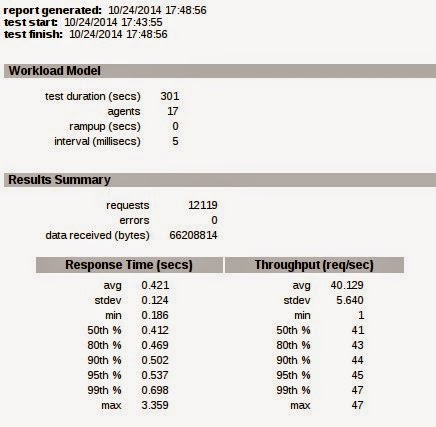
 and here are the results :

Test 1 with single machine setup

Then i try other setup, which difference are put session in postgresql and here the results :

Test 2 Django session using Postgresql

And then last one, i setup a load balanced setup with 2 django app server, here are the setup :

  • Memcached setup as shared memcache between 2 Django app
  • Nginx as a single entry load balance the application request to 2 Django app server
  • Postgresql is still separated machine.
  • Django Compressor is still used.
And here are the result of the test :

Django app load balanced with Nginx in front of application

As you see, the result is better if we horizontal scale the python serving django applications. The load balance in Nginx is a standard setup with 2 upstream point to django app server.

Even the Nginx server still hosting 1 django app, and other machine hosting only django app,with memcache in each server as shared memcache pool, and the postgresql is a single machine.

The improvement is huge. From 40 Req/sec to 117 Req/sec , 2x improvements. This still not optimize the database cache, as i using Django 1.6 and johny cache still not available at this time to be use with Django 1.6

On problem to be note, the django-compressor got problem when setup as multiple python app server, because the key to generate key cache prefix is using the host name, so in one another of the server, there will be missing static compressed file. So we just generate the compressed static in 1 machine, and copied to the other machine and this solved.


Monday, 6 October 2014

PDF generation in Django Apps

One of the beautiful thing when using Django is the rich set of application ready to use as a plugin in your project. Is it use at is or modify/extend with a little effort.

One of my project need to generate a PDF and the time is come to get some Django PDF application plugin. So Django documentation officially told to use reportlab. I try the reportlab, but got error with first try from the code in Django documentation stated here.

Then look further, i found pisa is very neat to generate a PDF for you with a common Django way. How does pisa do the job? Well it still need reportlab, and html5lib , and it just convert your HTML output into pdf output using your django view.

So we already have the html output in Django app, then just feed it to pisa, and the pdf will generated.
You can download pisa3.0.33 in here .

But also notice that pisa3.0.33 is got problem which cause it cannot run with reportlab>3.0 .

To fix it go to the installation of pisa , and find sx/pisa3/pisa_util.py :

if not (reportlab.Version[0] == "2" and reportlab.Version[2] >= "1"):

   raise ImportError("Reportlab Version 2.1+ is needed!")

REPORTLAB22 = (reportlab.Version[0] == "2" and reportlab.Version[2] >= "2")
This will make pisa fail when the import processed by python. To resolve this replace it with this code :
if not (reportlab.Version[:3]>="2.1"):

    raise ImportError("Reportlab Version 2.1+ is needed!")

REPORTLAB22 = (reportlab.Version[:3]>="2.1")

Then that's it, your pisa will work with Django.

The next post , i will give the code to generate the pdf with pisa in django.

Cheers

Wednesday, 1 October 2014

Display disk usage in graphical way

Recently, i got my disk usage 100% in my home folder. With using only du in linux, we got only text output about the disk usage. I need to see which folder occupy most of the disk space in a quick way, in a glance and in an interesting way, using graphical representation.

So i search for the application to do this in linux, and i found Baobab. This application name not imply its usage, but very neat. We can see the disk usage in a graphical way, using a ring chart , and also have the list of subdirectory we scan so we can got the directory which consume much of the disk space.

Baobab application
Baobab application screen shoot
With this, it is faster and quicker way to find the folder which occupy most of the space, even with remote folder. This feature i found most interesting.

For the website source and developer can go to baobab website

Nice to share this. Hope you got benefit from this share.

Sunday, 28 September 2014

Shellshock Vulnerability CVE-2014-6271

The Bash Shell have a new exploit named shellshock.

From Thursday 25 september 2014, Bash have a bug that realy make everybody paranoid. The exploit is CVE-2014-6271 which enable the attacker to run any code even without authenticating to the server, especially with DHCP services.

Stephane Chazelas discoverd this vulnerability in bash, related with the how the environment variables are processed by bash and this affect many of the linux / unix system which by default utilize bash shell. This affect Bash released 20years ago back to version 1.3

Lucky for me, i am in the BSD bandwagon, which by default not using Bash, but using tcsh or csh, which licensed under BSD license term. The reason Bash not a default install in BSD system because Bash is use GPL Licensing term.
But i don't know if this will change if Bash using BSD license, but i think because Bash was develop with no security in mind. Yeay Go BSD :)

But some servers use bash need to update. First you can test it with the command.

env x='() { :;}; echo vulnerable' bash -c "echo this is a test"

if the output print out vulnerable, then you need to upgrade your bash version to the latest. Redhat, Debian, Ubuntu, and all major Linux Distro already release a fix for this, but only days, the fix show that it only prevent no all the bug, like Redhat said in the website.

But still better patch first, as a first step for prevent the vulnerability. Also there are many test utility for this shellshock in the web. One that i found was Shellshock HTTP Test and Shellshock Vulnerability Test

Now for the update , in debian system you just run this command :

$sudo apt-get update && sudo apt-get install --only-upgrade bash

In Centos / Redhat system :

$sudo yum update bash

or download the rpm file with this command (in Centos 5.10) :

$ wget ftp://fr2.rpmfind.net/linux/centos/5.10/updates/i386/RPMS/bash-3.2-33.el5-10.4.i386.rpm

$sudo yum --nogpgcheck update bash-3.2-33.el5-10.4.i386.rpm

This Shellshock worse than last openssl vulnerability, because many old system affected like the cgi web server processing services. But in modern web application i had test, which running python, not affected by the shellshocks because not using Bash shell.

Tuesday, 2 September 2014

Control Cache directive for Web Server

When dealing with a Web application, the web server is our gateway to the application server. The best practice to separate the load between application code and static files are the task of the web server. This to make sure the application server just handle the thing they good of, the application.  Let the burden to handle the serving of static files be lifted from the application server. Have mercy for the application server.

So the best practice is the static files handled by web server directly, and the application generated content goes to the application server. Now the load already separated. Now to get more of your application speed, we want to control how long the static files get cache by the client browser.

The question is can this be done? Yes this is can be done, this is included in the HTTP protocol specification rfc7231. We can control how long the request result will be cached by user web browser, and newer web browser will respect this header if ever appear in the http request results.

So the directive can be use are :

cache-control: private, max-age=0, no-cache


This means cache-control is active.

The private directive means the request should not be cache by shared cache like proxy server. But the local private cache can do the caching.

Max-age means the maximum age of the request result that considered valid since first request result arrived in client and can be used by the client.

no-cache means don't do any caching in client web browser. The browser will always fetch the new content from the web server.

Note if you want to increase the max-age, then remove the no-cache directive.

This can be applied to any webserver, including Microsoft IIS without change anything in the registry. The same with Nginx or apache or lighttpd.

Good luck and happy serving web content.


Twitter Delicious Facebook Digg Stumbleupon Favorites More